How to manage semen and nitrogen tanks in GENNO
You'll know where each straw is, how many are free and when to refill each tank.
Before you start
- In the app, open More and tap Semen and Tanks. On the web, use Semen and Tanks in the side menu, under Reproduction.
- GENNO is organized like this: Tank, Rack, Position (canister), Batch and Straws.
- The tank and its structure are registered only on the web, with internet. Readings, batches, reservations and movements also work in the app offline.
Register the tank (web)
- Go to web.genno.app and click Tanks.
- Click New tank.
- Fill in Code (e.g.: T1), Name, Location, Model, Capacity (straws), Nitrogen (L), Minimum level (%) and Responsible.
- Under Structure, enter Racks, Canisters per rack and, if you want, Straws per canister.
- Click Save.
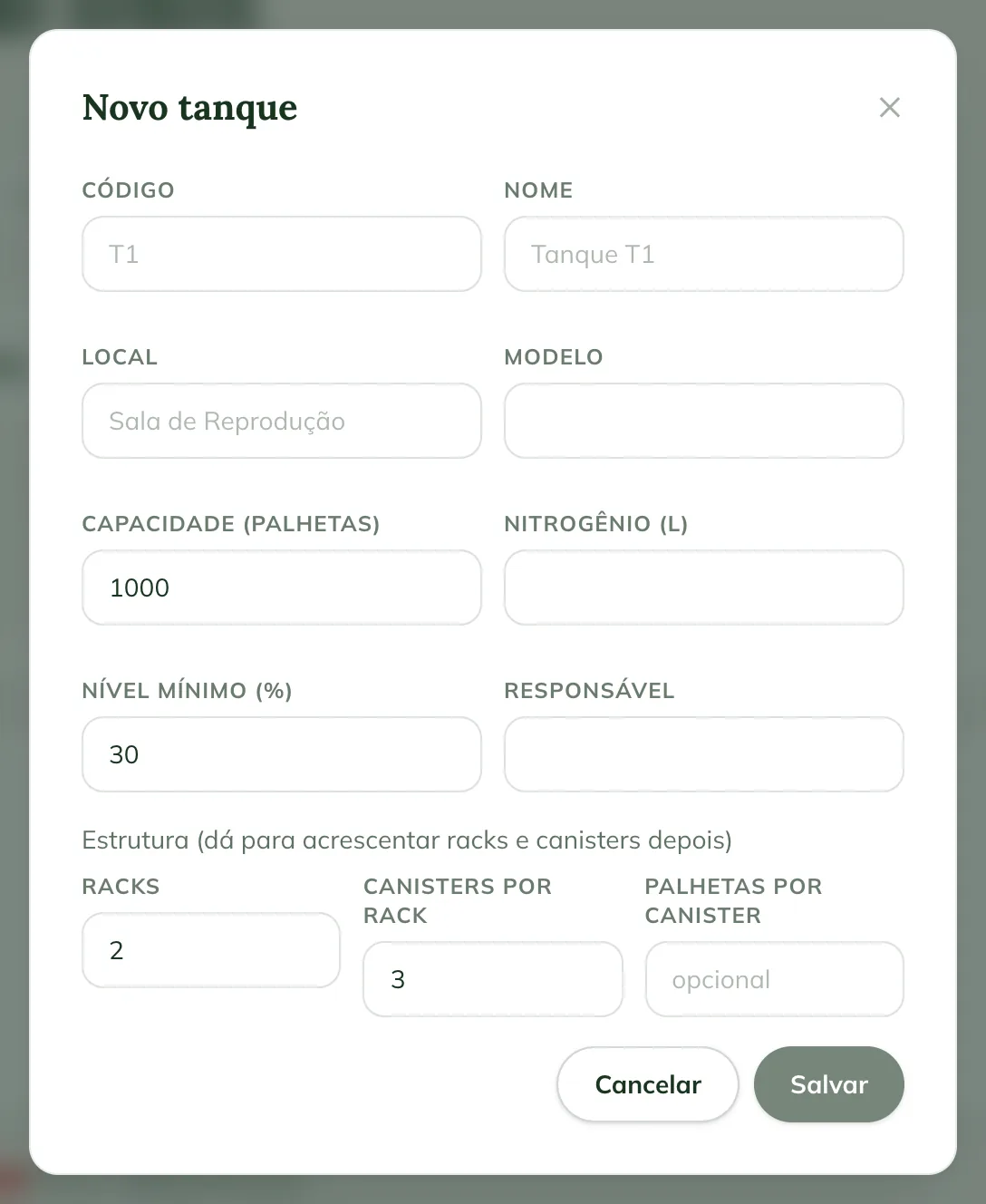
Then, on the tank page, the Position map tab offers + Rack (3 canisters), + Canister and Rename. Only an empty tank can be deleted.
Record a reading, refill and maintenance
- In the app, open the Tanks tab and tap the tank.
- Tap See details.
- Tap Record reading.
- Choose Reading, Refill or Maintenance.
- Enter Nitrogen level (%) and Temperature (°C). For a refill, enter Liters added and Level after (%).
- Fill in Responsible and tap Record.
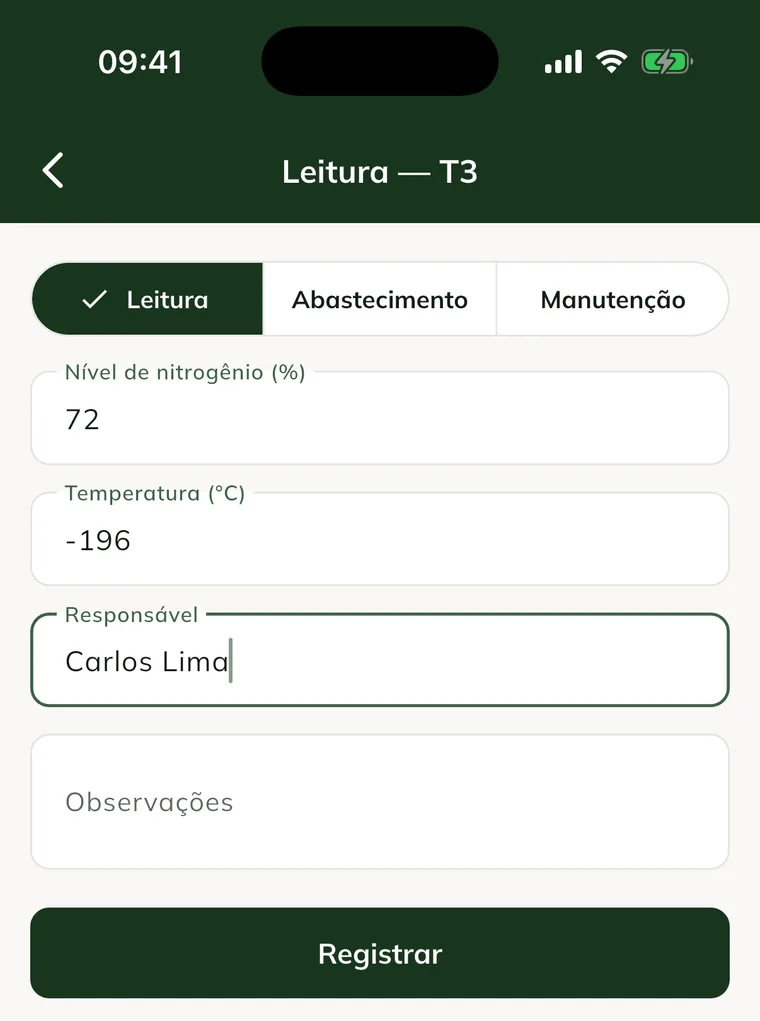
For maintenance, turn on Tank under maintenance. Alerts are paused until you record the return. On the web, the same records are on the Record reading, Record refill and Maintenance buttons on the tank page.
Follow the level and alerts
- On the tank screen, tap Nitrogen control.
- See the Nitrogen level history for Today, 7 days, 30 days or 90 days.
- Check the Refill forecast. It needs two level readings with consumption in the last 30 days.
- See the active Alerts and the History.
GENNO opens an alert when the level is below the minimum, the temperature is high or the tank has no recent reading. The alert is resolved when the cause goes away, for example after a refill.
Register a semen batch
- In Semen, tap New batch.
- Under Sire, choose the Stallion or Outside (enter the name).
- Under Collection information, mark Own collection or Purchased and fill in the date, place and method.
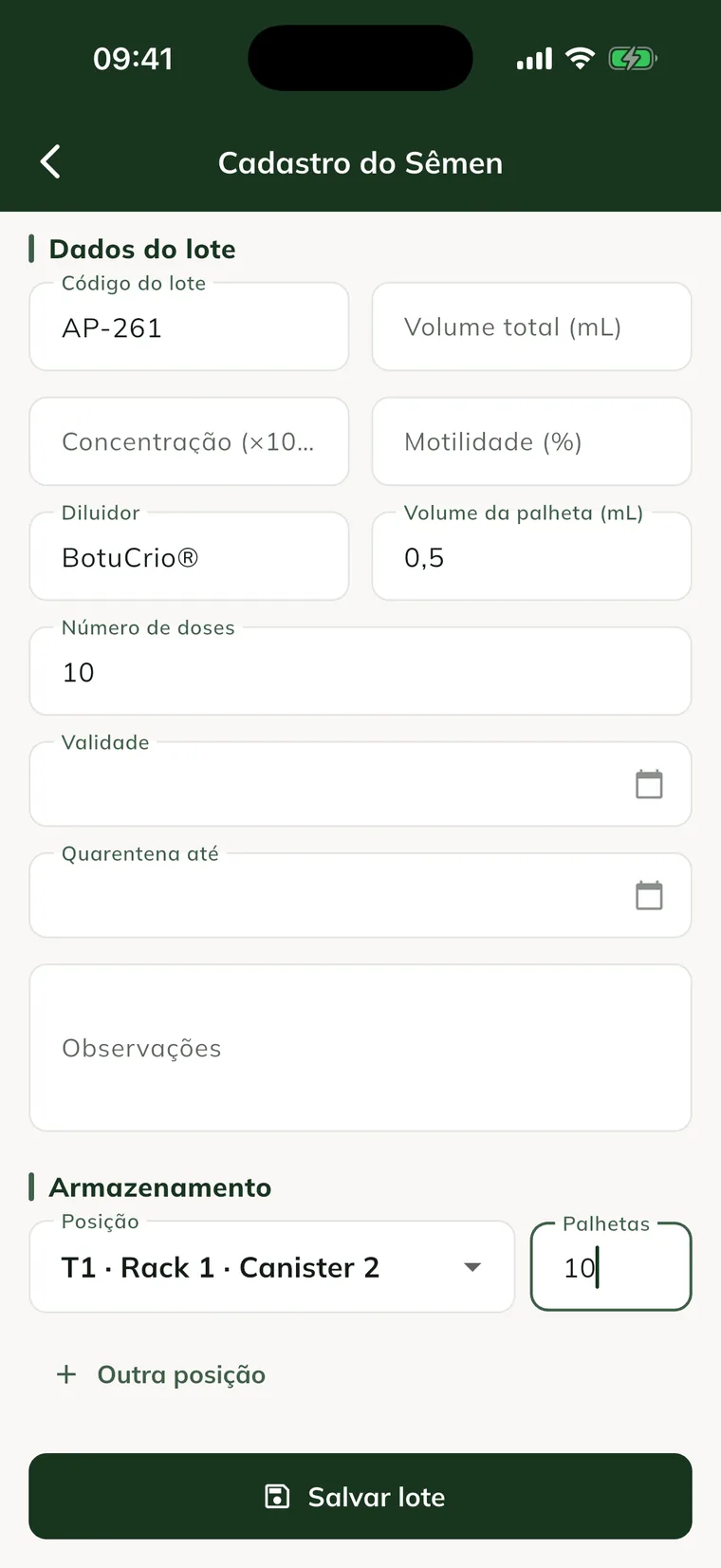
- Under Batch details, fill in Batch code, volume, concentration, motility, Extender, Straw volume (mL) and Number of doses.
- Enter Expiry and, if there is one, Quarantine until.
- Under Storage, choose the Position and the number of Straws. Use Another position to split the batch.
- Tap Save batch.
Understand the batch balance
Each batch shows the calculation Physical = Available + Reserved + Others:
- Physical: straws that are in the tanks.
- Reserved: straws set aside by active reservations.
- Others: blocked straws, from an expired batch or in quarantine.
- Available: what is left to use.
GENNO refuses any operation that would break this calculation and shows the reason.
Reserve straws
- Open the batch and tap Reserve.
- Enter Straws.
- Choose the Mare or, with Do not specify, fill in For whom.
- Choose the Planned use date. The reservation is valid until 7 days after that date; with no date, it doesn't expire.
- Tap Reserve.
Reserving doesn't move straws. To release the balance, tap Cancel on the reservation.
Use the batch for breeding or AI
- In Reproduction, tap the Breeding season icon and open the Breedings tab.
- Tap Record breeding.
- Choose the Mare and an insemination Method.
- In Semen bank batch, choose the batch.
- Adjust Straws used and, if there is one, choose the reservation in Use reservation.
- Tap Record breeding.
The stallion comes from the chosen batch. The straws leave the tank and the reservation is used right away. For semen from outside the tank, choose No batch (semen from outside the tank).
Other movements
On the batch screen, use Record use and Transfer. The batch menu has Exit, Discard, Entry and Adjustment.
- Choose the type of movement.
- Enter Leaves from (position) and, for a transfer, Goes into (position).
- Enter Straws and the fields for the type: Discard reason, Destination or Adjustment reason.
- Tap the Record button, which carries the name of the type (e.g.: Record transfer).
Movements can't be edited. To correct one, make an Adjustment. The Traceability icon shows everything about the batch, from collection to the result on the mare.
Common problems
The app says "No tanks on this property". The tank is registered on the web. Register it in Tanks on the web and sync the app.
"X would remain for Y reserved: use the reservation or cancel it first" appears. The exit would leave fewer straws than reserved. Use the reservation on a breeding or cancel it.
"Batch expired on..." or "Batch in quarantine until..." appears. A blocked batch can't be used or reserved. For an expired one, record the Discard.
"The position has only X of this batch" appears. You asked for more straws than the position has. Check the batch's Location tab.
The batch doesn't appear on the breeding. Only batches with straws in the tank and no block appear. Live cover doesn't use the semen bank.
Next steps

Didn’t this article solve it?
Talk to the GENNO team. Tell us what you were doing and, if you can, send a screenshot.