How to use the GENNO calculators and drug guide
You'll do the day-to-day calculations in the field and keep the result with the formula used.
Before you start
- In the app, open More and tap Tools. On the web, click Tools in the side menu, under Routine.
- In the app, the calculators work offline. On the web, calculating needs a connection.
- The drug guide only appears in the app after the first sync with internet.
Make a calculation
- Open the Tools Center.
- Tap the calculator. Use Search tool... if needed.
- Fill in the inputs. Some fields come with a default value.
- Tap Calculate.
- Check the Results and, under How it was calculated, the Entry and the Formula with your numbers.
- Tap Save calculation to keep it in the history.
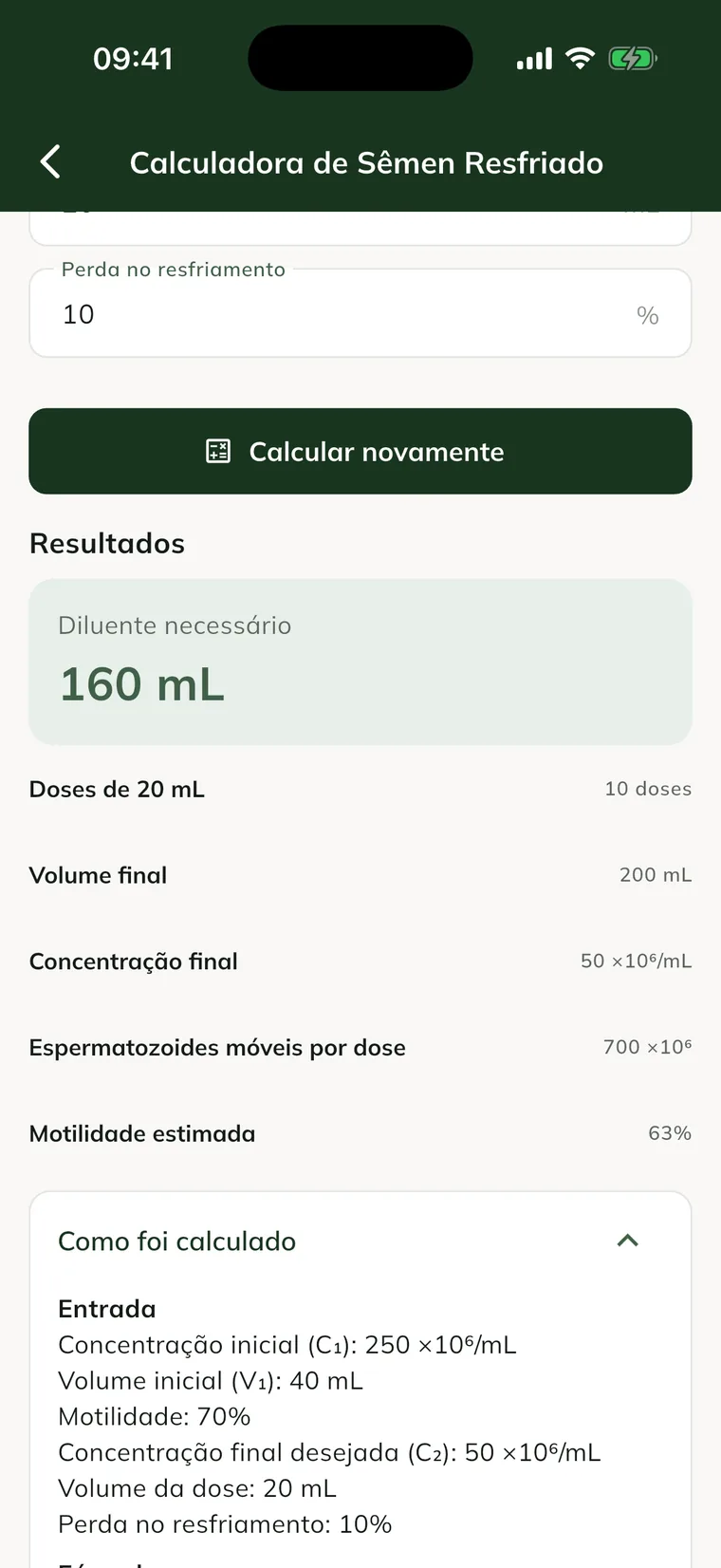
If you change a value, tap Calculate again. Warnings appear when the result falls outside the reference range.
The calculators and what each one asks for
Cooled Semen Calculator (dilution, doses and viability): Initial concentration (million/mL), Initial volume (mL), Motility (%), Target final concentration (million/mL, default 50), Dose volume (mL, default 20) and Cooling loss (%, default 10).
Freezing Calculator (planning and straws): Initial concentration (million/mL), Initial volume (mL), Motility (%), Sperm per straw (million, default 200), Volume per straw (mL, default 0.5), Estimated loss rate (%, default 10) and Straws per AI dose (default 4).
Foaling Date Calculator (based on the breeding date): Breeding/ovulation date.
ET Calculator (synchronization of donor and recipients): Donor ovulation (D0) and, under Recipients, each one's Name and Ovulation date. Tap Another recipient to add more.
Dose Calculator (quick calculation by weight, with the drug guide): Medication (drug guide) or Other (enter the details). Then Weight (kg), Dose and Concentration. Without a drug guide medication, choose Per kg or Fixed dose. With a medication chosen, empty dose and concentration use the drug guide values.
Estimated Weight (by weight tape): Heart girth (cm) and Body length (cm).
Body Condition Score (Henneke, 1 to 9): a score from 1 to 9 for Neck, Withers, Loin, Tailhead, Ribs and Behind the shoulder.
Unit Converter (volume, weight, temperature and concentration): Quantity, Amount, From and To.
The Trip Calculator is also in the center. It is explained in field trips and costs.
Save the freezing as a batch
- Make the calculation in the Freezing Calculator.
- Tap Save as batch.
- Check the semen registration, which comes filled in with the calculation data.
- Choose the stallion, the batch code and where to store it.
- Tap Save batch.
The calculation is saved in the history, linked to the batch created. This button only appears for users who can register semen batches.
Look up the drug guide
- In the center, tap Equine Drug Guide.
- Search in Search medication... or filter by class.
- Tap the medication to see Class, Presentation, Concentration, Reference dose, Routes and Frequency.
- Tap Calculate dose to open the calculator with the medication already selected.
The drug guide is a reference. Confirm on the package insert and with the responsible veterinarian.
To prescribe the medication and follow the doses, see how to start a treatment.
See the calculation history
- In the center, tap Calculation History.
- Filter by tool or see All.
- Tap the calculation to see inputs, formulas and result.
- To delete it, tap Delete. Only the person who saved it can delete it.
Common problems
The drug guide says "Drug guide not synced yet. Connect to download it." Connect the phone to the internet and open the center again. The drug guide downloads and then works offline.
"The target final concentration must be lower than the initial" appears. The semen is already below the target concentration. Lower the Target final concentration.
"Not enough semen for one straw." appears. The usable total doesn't reach one straw. Review volume, concentration and Sperm per straw.
I don't see the Save calculation button. Saving depends on your permission on the team. Ask the farm administrator.
Next steps

Didn’t this article solve it?
Talk to the GENNO team. Tell us what you were doing and, if you can, send a screenshot.