How to attach photos, exams and documents to the animal
Everything about the animal stays with its record: photos, the lab report, the X-ray, the breeder's spreadsheet.
Before you start
- Each file can be up to 10 MB.
- PDF, image, Word, Excel, TXT and CSV are accepted.
- In the app, attaching works offline. The file uploads on the next sync.
- Reports generated by GENNO are in Documents (menu), not in the attachments. See how to generate and sign a report.
In the app
- Open the animal and tap the Documents tab.
- Tap Attach.
- Choose where the file comes from:
- Camera: takes the photo right away.
- Gallery: picks several photos at once.
- Files: PDF, image, Word, Excel, TXT or CSV.
- In Description (optional), write what it is. E.g.: October blood count.
- Tap Attach (or Attach N files).

Tap the attachment to open it. On the attachment screen, you can Share, Open with another app or Delete.
On the web
- Open the animal in Animals.
- Scroll to the Attachments box.
- Drag the files into the box, or click to choose them.
- In Category, choose Photo, Exam, Document or Other.
- Write the Description (optional).
- Click Attach.
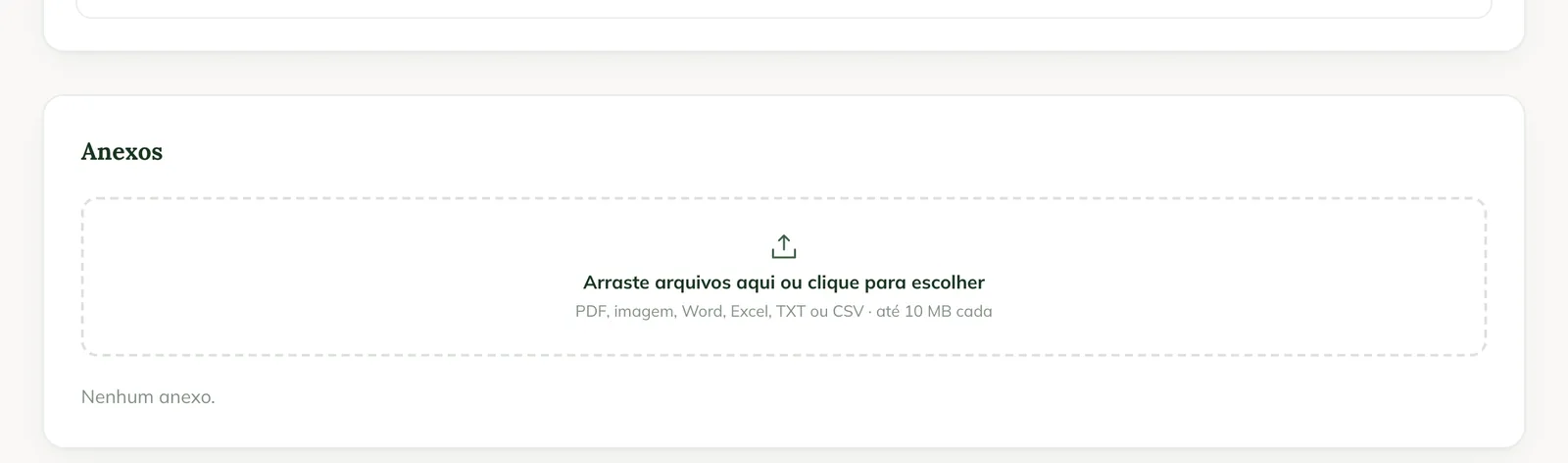
To open one, click the attachment. Files without a preview (such as Word and Excel) show Download.
Common problems
The attachment shows "Waiting to send". It is saved on the phone and hasn't uploaded yet. Sync when you have internet.
The attachment shows "Upload refused". The server didn't accept the file. Tap Try again or check whether it is over 10 MB.
"Could not read the file." appeared. The format isn't accepted or the file is corrupted. Save it as a PDF or image and try again.
Next steps

Didn’t this article solve it?
Talk to the GENNO team. Tell us what you were doing and, if you can, send a screenshot.