How to use GENNO offline in the field
You work in the paddock with no signal and, when the internet comes back, everything you recorded uploads on its own.
Before you start
Do the first sync over Wi-Fi or a good 4G connection. Without it, the phone doesn't have the animals and records to work offline.
How the app works offline
- Without internet, the app uses the data already on the phone.
- What you create or edit is saved on the device, in a send queue.
- When the internet comes back, GENNO sends the queue in the order you worked.
- Then it receives what changed on the web and on the team's other phones.
When the phone has no connection, a red crossed-out cloud appears at the top of the main screens.
Records that haven't been uploaded yet show notices such as Waiting to send (on the animal record), waiting to send (on doses) or Waiting to be sent to the server. (on the treatment). An invoice created offline appears without a number and with a provisional total until it is sent.
What works offline
Field work works offline:
- Looking up animals, history and tasks.
- Clinical visits, prescriptions and dose administration (inventory is checked on the phone).
- Reproductive exams, ovulation, protocols (starting and following them) and alerts.
- Season plan: breedings, AI and embryos.
- Pregnancy, foaling and foal care.
- Semen and tanks: batches, movements and tank records.
- Inventory: stock in, stock out, products and suppliers.
- Services and prices, invoices, entries, cash flow and clients.
- Calculators, field trips and reports marked as Works offline in the Reports center.
What requires internet
| Where | What requires a connection | Notice in the app |
|---|---|---|
| Protocols › Set up | Creating or editing in-house protocols | Setting up protocols requires a connection. Starting and following them works offline. |
| Protocol history | Viewing the history | The history is available when online. |
| Finance › Costs | Costs per property and reproductive costs | Costs require a connection. |
| Animal record › Finance | The animal's cost (invoices open offline) | The animal's cost requires a connection. |
| Billing and collection | Month summary and invoice PDF | The month's summary requires a connection. |
| Client record | Inviting and revoking portal access | Owner portal unavailable offline. |
| Documents | Uploading a file and opening an uploaded file | Uploading requires internet. PDF files can be uploaded on the web. |
| Professional registration | Saving title, CRMV and signature | |
| Reports | Reports with the cloud icon | Requires connection |
| Tools › drug guide | Downloading the drug guide for the first time | Drug guide not synced yet. Connect to download it. |
Some records are created only on the web: registering a nitrogen tank and creating or closing the breeding season.
When the internet comes back
GENNO sends the queue on its own when the connection returns, when you open the app and when you come back to it. To check:
- Tap More in the bottom bar.
- Look at the Sync card in the Account section.
- Tap the card to open the Sync screen.
- If you want to send right away, tap the Sync now icon at the top.
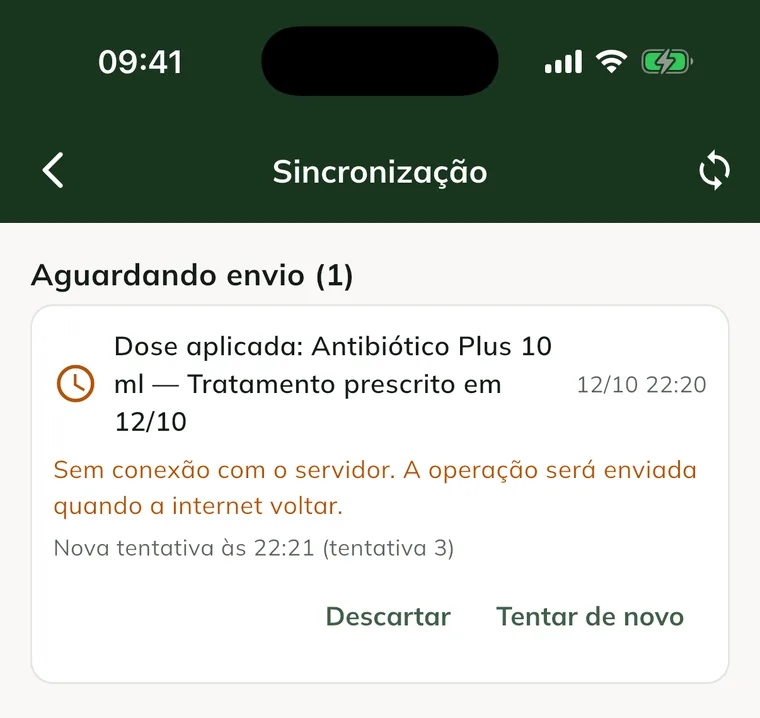
The screen splits the items into two lists:
- Waiting to send: will upload on its own. The clock icon indicates a temporary failure, with the Retry at line and the attempt number. The hourglass indicates the item is waiting for another record created offline to upload first.
- Need your attention: the server rejected it. These items won't upload without you.
When the queue is empty, All synced and No pending changes on this device. appear.
Resolve a rejected record
The server rejects a record when something doesn't add up, for example another device changed the same record or used the same stock. Nothing disappears without notice: the item stays under Need your attention, with the reason in red.
- Open More › Sync.
- Read the reason below the rejected item.
- Fix the cause in the app (for example, record the stock-in of the missing product).
- Tap Try again.
- If the record is no longer needed, tap Discard and confirm with Discard on the Discard operation? notice.
Discarding can't be undone: the item is not sent and can't be recovered.
If a record depends on another one that was rejected, it is also rejected, with the notice Depends on and the name of the original record. Resolve the original record first.
When you get back to the farm office, connect to Wi-Fi and open GENNO. That way the day's visits and invoices upload to the farm dashboard.
Sign out with pending uploads
If you tap Sign Out with items in the queue, the app shows There are unsent changes.
- Cancel keeps you in the app. Sync before signing out.
- Sign out anyway signs you out. The changes stay stored on the device and are sent when you sign in again with the same account.
Common problems
"No connection to the server. The operation will be sent when the internet is back." appeared. This is the normal offline behavior. The record was saved and is in the queue.
"The server is unavailable right now. Try again." appeared. The problem is on the server, not on your phone. The item stays in the queue and the app tries again on its own.
"Session expired. Sign in again." appeared. Sign in again with the same email and password. The queue stays stored on the device.
An item is stuck in "Waiting to send". Check the time in Retry at. If you already have internet, tap Try again or Sync now.
"Product not found. Sync the records." (or a similar message) appeared. The phone doesn't have that record yet. Connect to the internet, sync and repeat the action.
"You don't have permission to do this." appeared. Your role on the team doesn't allow this action. Ask the farm administrator to review your permission, then discard or try again.
Next steps

Didn’t this article solve it?
Talk to the GENNO team. Tell us what you were doing and, if you can, send a screenshot.