Understand GENNO access profiles
The access profile says what each person on the team can see and do in each part of GENNO. It works the same on the web and in the app.
The four system profiles
| Profile | For whom | Summary |
|---|---|---|
| Administrator | Farm owner or manager | Full access. Can't be changed. |
| Veterinarian | Team veterinarians | Clinic, reproduction, prescriptions, inventory and billing. |
| Staff | Grooms and field team | Routine and field: tasks, doses, inventory and field trips. |
| Intern | Interns and visitors | View only. |
System profiles can't be changed. To have a different profile, duplicate one of them and adjust the copy. See how to create an access profile.
What each profile does, area by area
"Everything" means all operations in that area. A dash means no access.
| Area | Administrator | Veterinarian | Staff | Intern |
|---|---|---|---|---|
| Animals | Everything | Everything | View and reports | View and reports |
| Properties | Everything | View and reports | View and reports | View and reports |
| Visits | Everything | Everything | — | View and reports |
| Reproduction and season | Everything | Everything | — | View and reports |
| Pregnancy and neonatal | Everything | Everything | — | View and reports |
| Protocols (templates) | Everything | Everything | View | View |
| Tasks and schedule | Everything | Everything | Everything | View |
| Intelligence | Everything | Everything | Everything | View |
| Treatments | Prescribe and give dose | Prescribe and give dose | Give dose | View |
| Inventory | Everything | View, move stock and reports | View, move stock and reports | View and reports |
| Products and suppliers | Everything | Everything | — | — |
| Semen and tanks | Everything | Everything | View, move stock and reports | View and reports |
| Tools | Everything | Everything | Everything | View |
| Vehicles and field trips | Everything | Everything | Everything | View |
| Services and prices | Everything | View | — | View |
| Finance | Everything | Everything except recording payments and cancelling | — | — |
| Clients | Everything | Everything | View | — |
| Documents | Everything, including signing | Everything, including signing | View and upload files | View |
| Owner portal | Everything | — | — | — |
| Users and profiles | Everything | — | — | — |
| Audit | View | — | — | — |
| Organization | Change | — | — | — |
| Custom | View and request quotes | — | — | — |
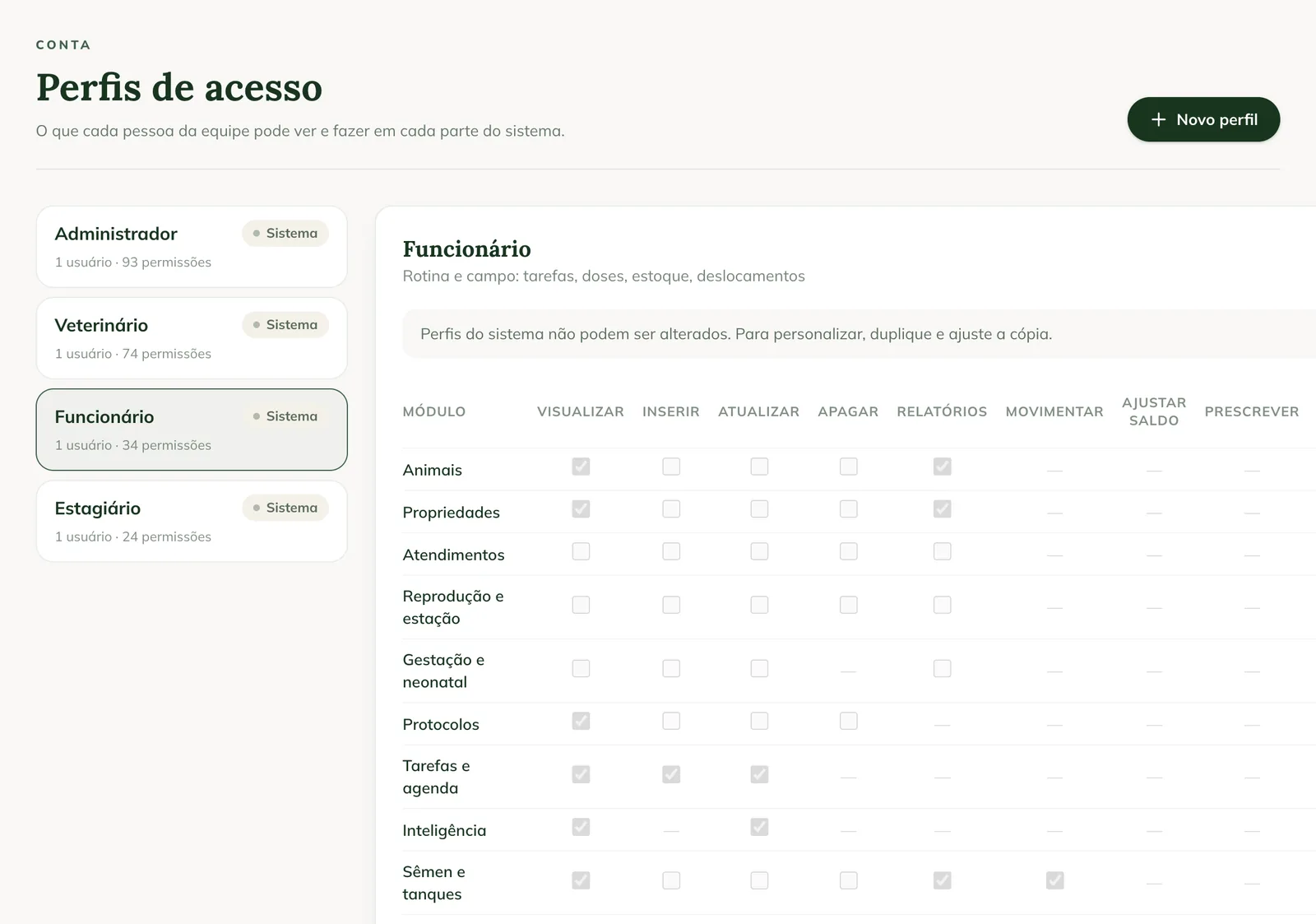
The operations
In the matrix on the Access profiles screen, each column is an operation:
- View, Create, Update and Delete: look up, create, edit and remove.
- Reports: generate the PDF reports for that area.
- Move stock and Adjust balance: record stock in and out for inventory or semen, and correct the balance.
- Prescribe and Give dose: create the treatment and record each dose.
- Record payment and cancel: settle and cancel invoices and entries.
- Upload file and Sign and void: attach documents and sign or void reports.
- Request and approve quotes: request a Custom report and approve the quote.
The profile and the plan
The profile doesn't unlock what the farm's plan doesn't include. If the plan doesn't include a module (for example, finance or the portal), nobody sees that area, not even the administrator. In the app, the area appears as Module Locked.
Where to see your profile
- In the app: More › My Profile, in the Access profile field. It is Set by the administrator, on the web.
- On the web: Profile, right below your name.
Common problems
"You don't have permission to do this." appeared. Your profile doesn't allow that operation. Ask the administrator to change your profile or create a profile with the permission.
My profile was changed and the app is still the same. The app updates permissions on the next access. Sync, or sign out and sign in again.
Next steps

Didn’t this article solve it?
Talk to the GENNO team. Tell us what you were doing and, if you can, send a screenshot.