How to receive notices and request a visit in the Portal
This article is for the owner. In Notices you read what the veterinarian sent about your animals, request a visit and choose how you want to be notified.
Read the notices
- Sign in to the Portal and click Notices.
- Each notice shows the title, the type and the date. The types are Visit summary, Follow-up, Reminder, Dose and Test result. New ones have a green dot.
- When the notice is about a dose you give yourself, click Dose given after giving it. The veterinarian sees the confirmation.
- To talk to the veterinarian, click Talk to and their name (opens WhatsApp) or Call.
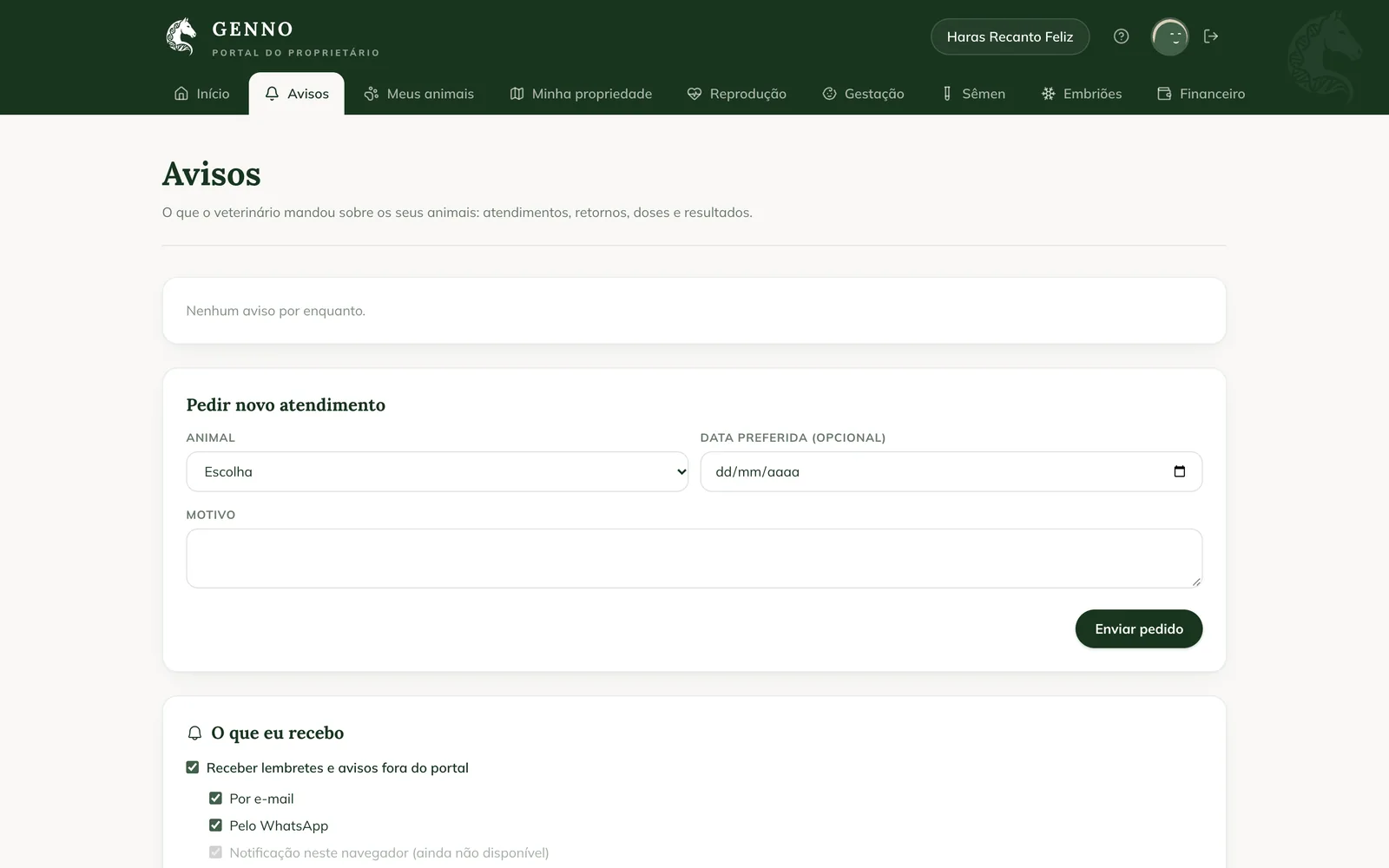
Request a new visit
- In Request a new visit, choose the Animal.
- If you want, choose the Preferred date (optional).
- In Reason, describe what is happening.
- Click Send request. Request sent. The vet replies here. appears.
The request appears right below, with its status: Waiting for the vet, Accepted or Not visited, and the veterinarian's reply. In an urgent case, call the veterinarian: the request is not an emergency service.
On the farm's side, the request arrives in the schedule. See how to reply to a Portal request.
Choose what you receive
In What I get:
- Keep Receive reminders and notices outside the portal checked to also receive them outside the Portal.
- Choose the channels: By email and Via WhatsApp. A channel without a registered email or phone appears as (not registered): ask the farm to complete your registration.
- In Medication reminders, choose Every dose, right on time or One summary per day. For the summary, choose the Summary time.

Nothing is sent between 10 p.m. and 7 a.m., except the dose reminder at the time set by the veterinarian. Notification in this browser isn't available yet.
Stop receiving
Emails and messages have the I don't want to receive them anymore link. When you turn them off, notices stay only in the Portal. To receive them again, check Receive reminders and notices outside the portal again, in Notices.
Common problems
"Choose the animal and describe the reason." appeared. The request needs the animal and the reason. Fill in both and send it again.
No animal appears to choose. The farm hasn't linked your animals to your client record yet. Ask the farm.
I don't receive the notices on WhatsApp. Check that Via WhatsApp is checked and that your phone is in the farm's registration.
Next steps

Didn’t this article solve it?
Talk to the GENNO team. Tell us what you were doing and, if you can, send a screenshot.