How to follow GENNO Intelligence
Intelligence follows the farm's data and tells you what needs attention: an overdue dose, a mare to reassess, low stock, a vaccine about to expire. It suggests; the decision is always yours.
Before you start
- Viewing and deciding on items is for the Administrator, Veterinarian and Staff, by default. The Intern can only view.
- Items are calculated on the server every 15 minutes. In the app, those from the last sync appear.
See what needs attention (web)
- At web.genno.app, click Intelligence in the menu. The number next to it shows the unseen items.
- At the top, see Unseen, Alerts, Recommendations and Indicators.
- Use the Alerts, Recommendations, Next actions, Indicators and History tabs.
- Filter by area: All areas, Clinical, Reproduction, Pregnancy, Protocols, Inventory, Semen and tanks, Tasks, Documents, Indicators and the other areas turned on.
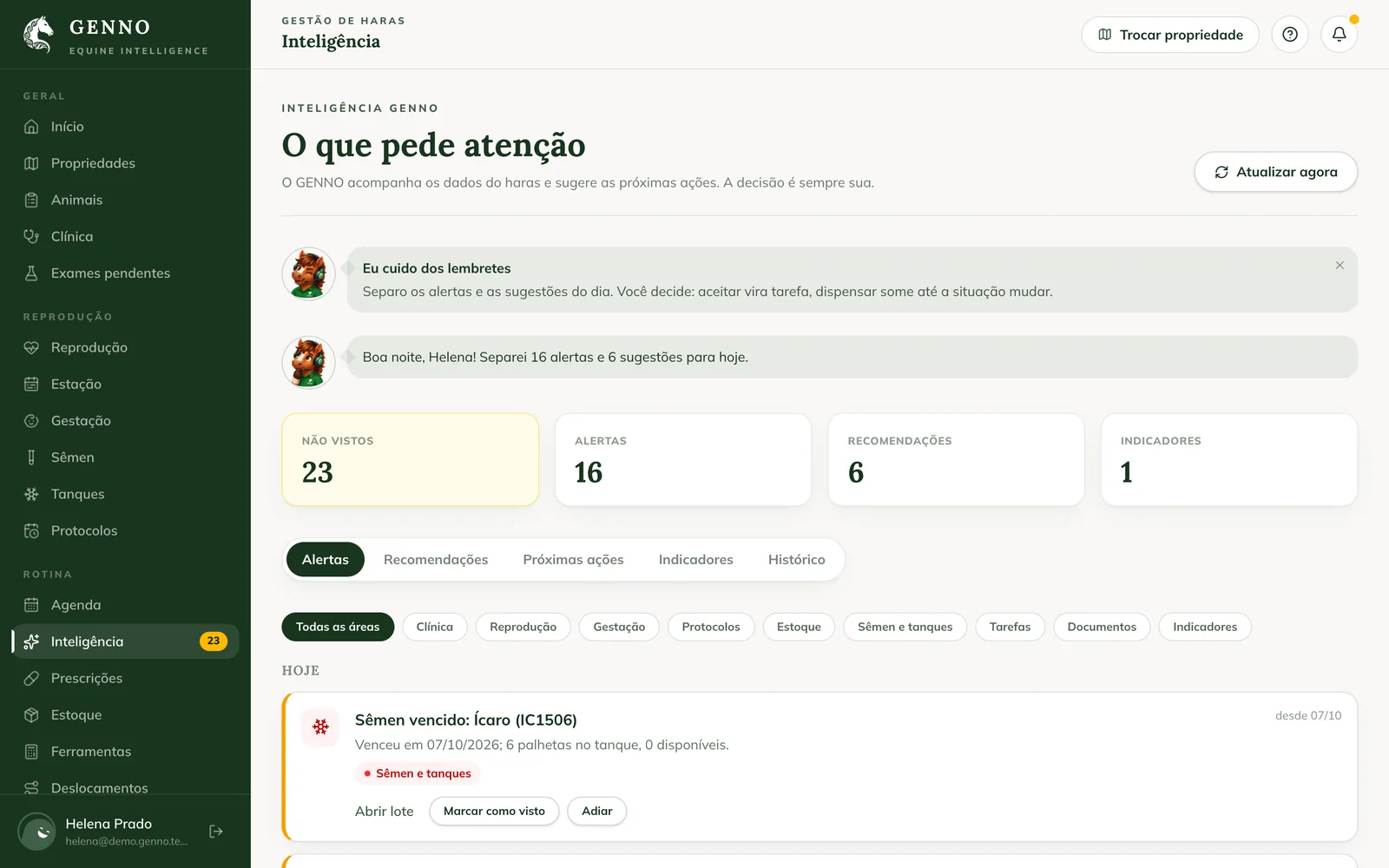
Click Refresh now to recalculate without waiting 15 minutes.
Decide on each item
On each item:
- Mark as seen: you already know about it. The item leaves the unseen list.
- Snooze: it comes back later. Choose Tomorrow at 8 a.m., In 3 days, In 1 week or Another date.
- Dismiss: for recommendations and indicators, when it doesn't apply. Write the Reason (optional). The item only comes back if the situation changes.
- Create task or Accept: for recommendations. Create task asks for the Date and time and puts the task in the schedule.
The item's links take you to the right screen, such as the prescription, the schedule or the semen batch. The alert disappears on its own when the situation is resolved.
Next actions and indicators
- Next actions: what is planned, grouped into Today, Tomorrow, Next 7 days and Later.
- Indicators: the Indicators out of the ordinary, compared with the property's own history, the Animals that need follow-up and the Critical stock.
Adjust the areas and limits
The administrator chooses what Intelligence follows.
- Click Settings and scroll to the GENNO Intelligence card.
- Under Areas turned on, turn off the areas the farm doesn't use.
- Adjust the limits of each area, such as the days before expiry to warn, the stock level to suggest restocking or the maximum temperature.
- Click Save.
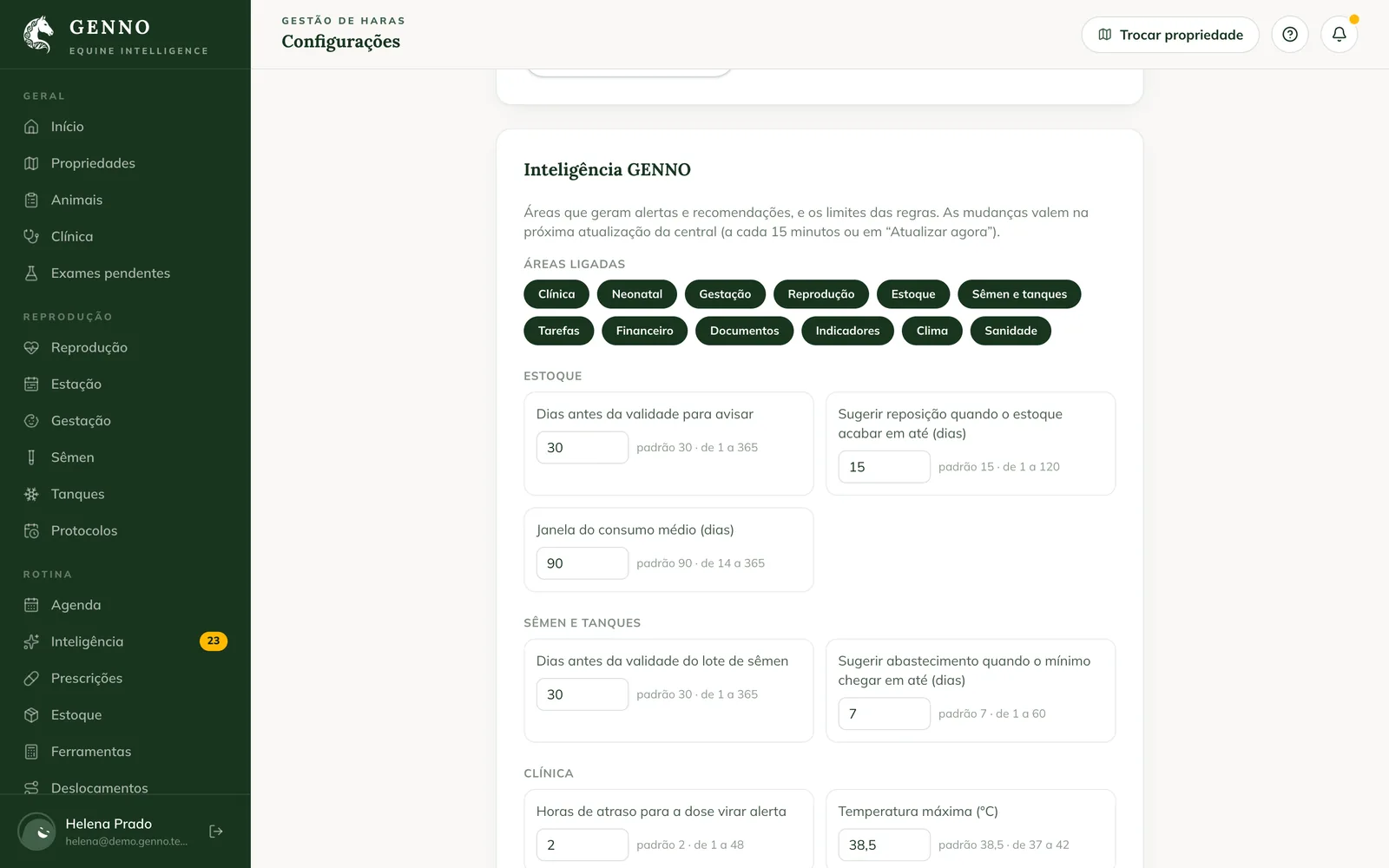
Changes apply on the next refresh of the center. Notifications on the phone and in the browser are set up per person. See how to set up notifications.
In the app
- In More, tap GENNO Intelligence.
- Use the Now, Recommendations, Next actions and Indicators tabs. The History icon at the top shows what was decided in the last 7 days.
- Tap the item and choose Mark as seen, Snooze, Dismiss, Create task or Accept.
Decisions made offline upload on the next sync. The animal record also shows its items, under Follow-up.
Common problems
I resolved the issue and the alert is still there. The center recalculates every 15 minutes. Click Refresh now or wait for the next refresh.
An area doesn't appear in the filters. It is turned off in Settings › GENNO Intelligence, or the plan doesn't include that area.
The app shows "It may have been resolved. Sync to see the current status." The item changed on the server. Sync the app.
Next steps

Didn’t this article solve it?
Talk to the GENNO team. Tell us what you were doing and, if you can, send a screenshot.