How to build the animal's pedigree
The tree shows the animal, the parents, the grandparents and up to the fifth generation. With it, GENNO calculates the inbreeding and builds the pedigree PDF.
Before you start
- Building the tree is for the Administrator and Veterinarian, by default.
- The sire and dam can also be chosen when registering the animal. See how to register an animal.
- An ancestor that isn't from the farm is added as outside: it stays only in the tree, doesn't join the herd or the schedule, and doesn't count toward the plan's animal limit.
Complete the tree (web)
- At web.genno.app, open the animal record and scroll to Pedigree.
- On the Pedigree (5 generations) tab, empty slots appear with + and the name of the position, such as Sire, Dam, Paternal grandsire or Maternal granddam. Click the slot.
- If the ancestor is in GENNO, use Already registered and choose the animal.
- If it isn't, use New external ancestor and fill in Name, Registration, Birth, Breed and Coat color.
- Click Save.
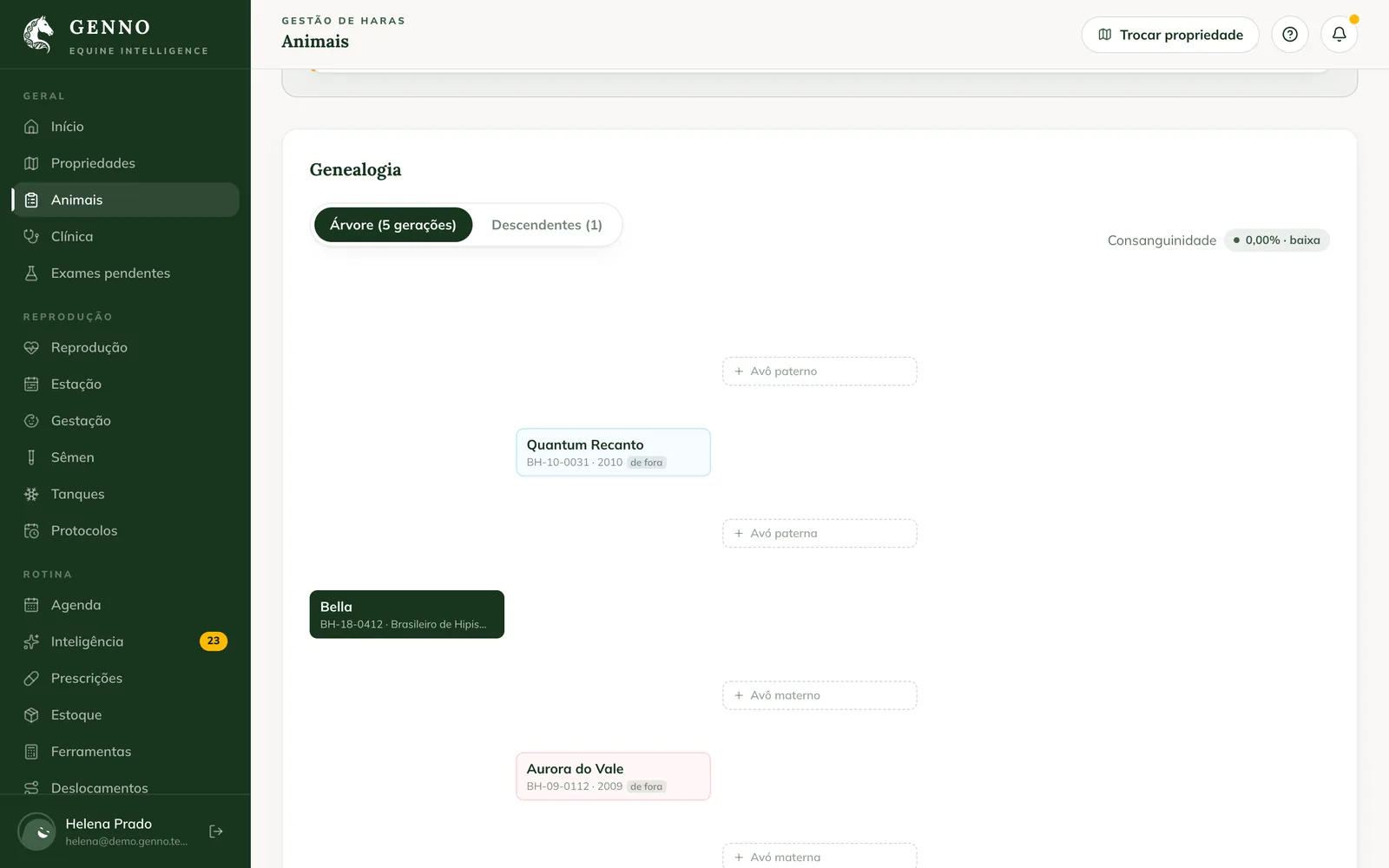
Repeat as far as you know. Click an ancestor from the herd to open its record.
Inbreeding
Next to the tabs, the animal's Inbreeding appears as a percentage, with the label low, moderate or high. If the sire and dam have ancestors in common, they are highlighted in the tree and listed below, with how much each one contributes.
The calculation is Wright's coefficient over 5 generations. An unknown ancestor counts as unrelated. It is informative: the decision belongs to the professional. To see the inbreeding of a mating before doing it, see how to simulate a mating.
Offspring
The Offspring tab lists the animal's offspring and Grand-offspring, with sex and birth.
Pedigree PDF
On the animal record, click Pedigree (in the app, Pedigree (PDF), on the Pedigree tab). The PDF has the 5-generation tree, the inbreeding and the offspring.
In the app
Open the animal record and the Pedigree tab. It shows the Sire and the Dam, the Pedigree (5 generations) and the Inbreeding. Drag and use two fingers to zoom. Tap an ancestor from the herd to open its record.
Offline, Offline: pedigree built from the horses on this device. appears. Completing the tree with new ancestors is done on the web.
Common problems
The ancestor doesn't appear in Already registered. For sire and grandsires, the list shows only males; for dam and granddams, only females. Check the sex in the registration, or use New external ancestor.
The inbreeding is 0% but I know they are related. The tree is incomplete. Register the grandparents and great-grandparents on both sides.
I opened an ancestor and "Ancestor from outside the herd: shows only in the pedigree tree." appeared. It was registered as outside. It has no full record, passport or schedule.
Next steps

Didn’t this article solve it?
Talk to the GENNO team. Tell us what you were doing and, if you can, send a screenshot.