How to keep the horse's passport
The passport brings the horse's health together in one place: vaccines, EIA and glanders tests, movement permits (GTA), owners and recent medications.
The GENNO passport doesn't replace the GTA (Brazil's animal movement permit), the state equestrian passport or the FEI passport.
Before you start
- Recording vaccines and tests is for the Administrator and Veterinarian, by default. So are movement permits and owners.
- In the app, it works offline, on the record's Passport tab. The record uploads on the next sync.
Record a vaccine
- Open the animal record and scroll to Passport (in the app, open the Passport tab).
- Click + Vaccine (in the app, Vaccine).
- In Diseases covered, select the vaccine's diseases, such as Equine influenza or Tetanus.
- If the vaccine came from inventory, choose it in Vaccine from stock (optional) and enter the Quantity (in the product unit). The inventory is deducted.
- Fill in the Brand name, the Date given, the Dose in the series (1st dose, 2nd dose, 3rd dose or Booster), the Route and the Injection site.
- Fill in the Manufacturer, the Batch and the Batch expiry.
- Check the Next dose, the Veterinarian and the License (CRMV). If left blank, the next dose is suggested from the dose in the series, and the veterinarian is you.
- Click Save.
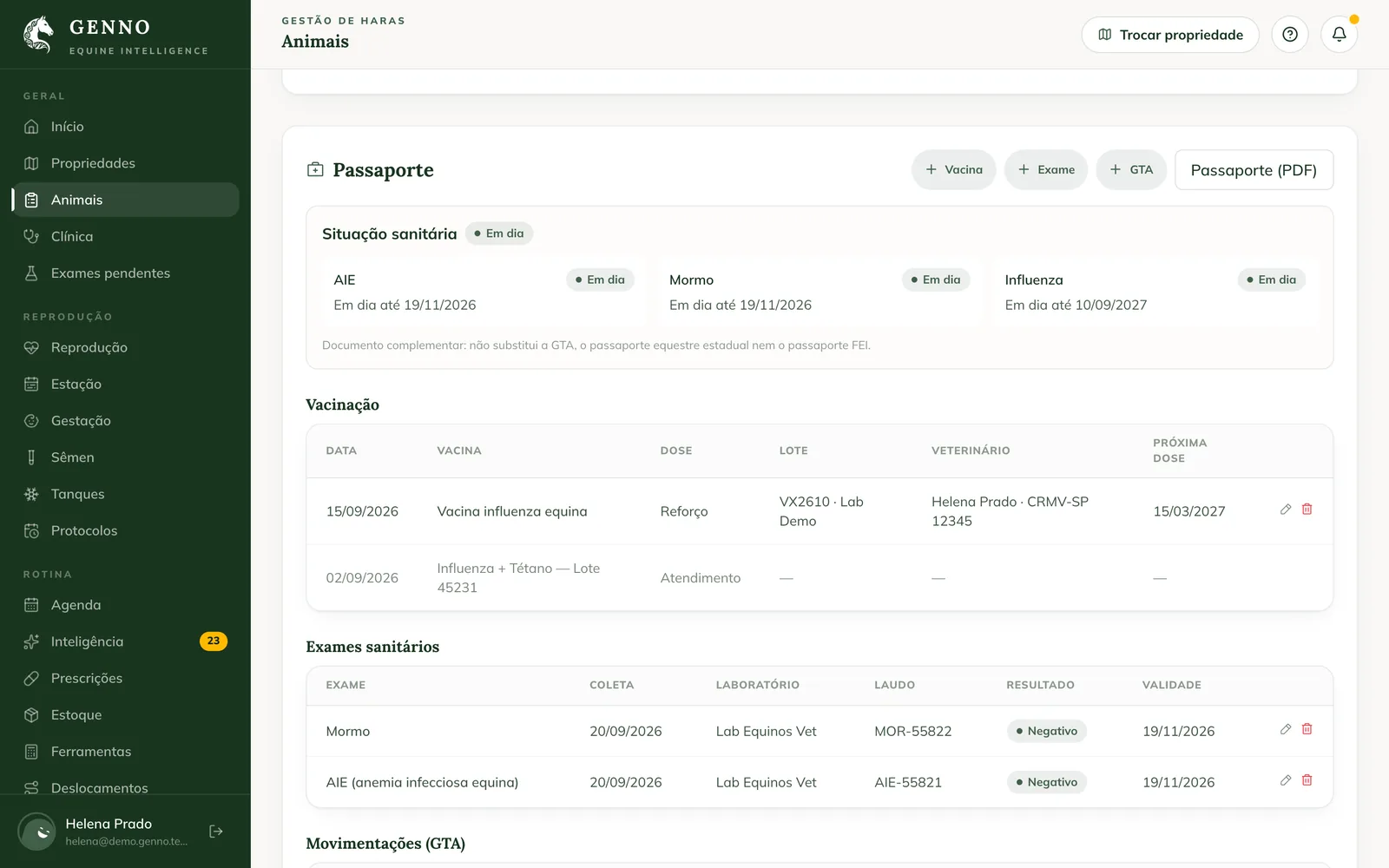
Vaccines given during visits appear in the list as Visit. To deduct from inventory, the property must be selected at the top of the screen.
Record a health test
- Click + Exam.
- In Exam, choose EIA (equine infectious anemia), Glanders or Other (and write the Test name).
- Fill in the Laboratory, the Report no., the Collection date, the Result and the Result date.
- Check the Expiry. If left blank, it is the collection date plus the validity set in Intelligence › Health, in the settings.
- In Report (PDF or image), attach the laboratory report.
- Click Save.
Record a movement (GTA permit)
- Click + Movement permit.
- Fill in the Permit no., the Date, the Origin and the Destination.
- In Purpose, choose Event, Sale, Reproduction or Other. Fill in the Permit expiry.
- In Movement permit (PDF or image), attach the file.
- Click Save.
The health status
At the top of the passport, the Health status shows EIA, glanders and influenza, each one with Up to date, Expiring soon, Expired, Awaiting result, Incomplete series, Positive or No registration. Expirations also become alerts in Intelligence.
Owners
Under Owners, the history shows who owned the horse and since when.
- Change owner: choose the New owner (blank unlinks), or write in Or just the name (outside the client list), and the Change date.
- Previous owner: record a past owner, with Since and Until.
Changing the owner also changes the animal's link to the client: the new owner starts seeing the animal in the Portal, and the previous one no longer sees it. See how to invite the owner to the Portal.
Recent medications and PDF
Medications in the last 90 days lists the products given in treatments, with the doses and the last date. Click Passport (PDF) (in the app, PDF) to generate the full passport.
Common problems
"Choose the property at the top of the screen to deduct the vaccine from inventory." appeared. Choose the property in Switch property and record the vaccine again.
I deleted a vaccine and the inventory changed. A vaccine that came out of inventory goes back to it when deleted. To change the product or the quantity, delete it and record it again.
The app shows "The history appears after opening with internet." The owner history comes from the server. Open the tab once with internet.
Next steps

Didn’t this article solve it?
Talk to the GENNO team. Tell us what you were doing and, if you can, send a screenshot.