How a visit becomes an invoice in GENNO
You'll understand the money trail in GENNO: from the medication given in the field to the invoice paid by the client.
How it works
GENNO records the charge in two ways:
- Medication given. When you give a dose, inventory is deducted and the cost is recorded. If the product has a sale price, the usage goes straight into the visit invoice.
- Service performed. When you record a visit, exam, breeding or other event, the service linked to it goes to To invoice. Then you group a client's services into a single invoice.
The client for each charge is the animal's owner. If the animal has no owner, the property owner applies.
Before you start
- The farm's plan must include Finance. Without it, the menu doesn't appear.
- Register the clients in Clients and link each one to their animals or properties. See how to register clients.
- For the medication to go into the invoice, the product must have a sale price in inventory.
- Issuing invoices is for administrators and veterinarians. Recording payments and cancelling invoices is only for administrators.
1. Register the services with automatic charging
Do this once. After that, each recorded event creates the charge on its own. The events are in how to register services and prices.
- In the app, tap More and then Services and prices. On the web, open Finance > Invoices > Services and prices tab.
- Tap New service.
- Fill in Name, Category and Price.
- In Charge automatically when…, choose the event. Examples: Clinical visit recorded, Reproductive exam / ultrasound, Breeding or insemination, Trip (price per km).
- Tap Save service (in the app) or Save (on the web).
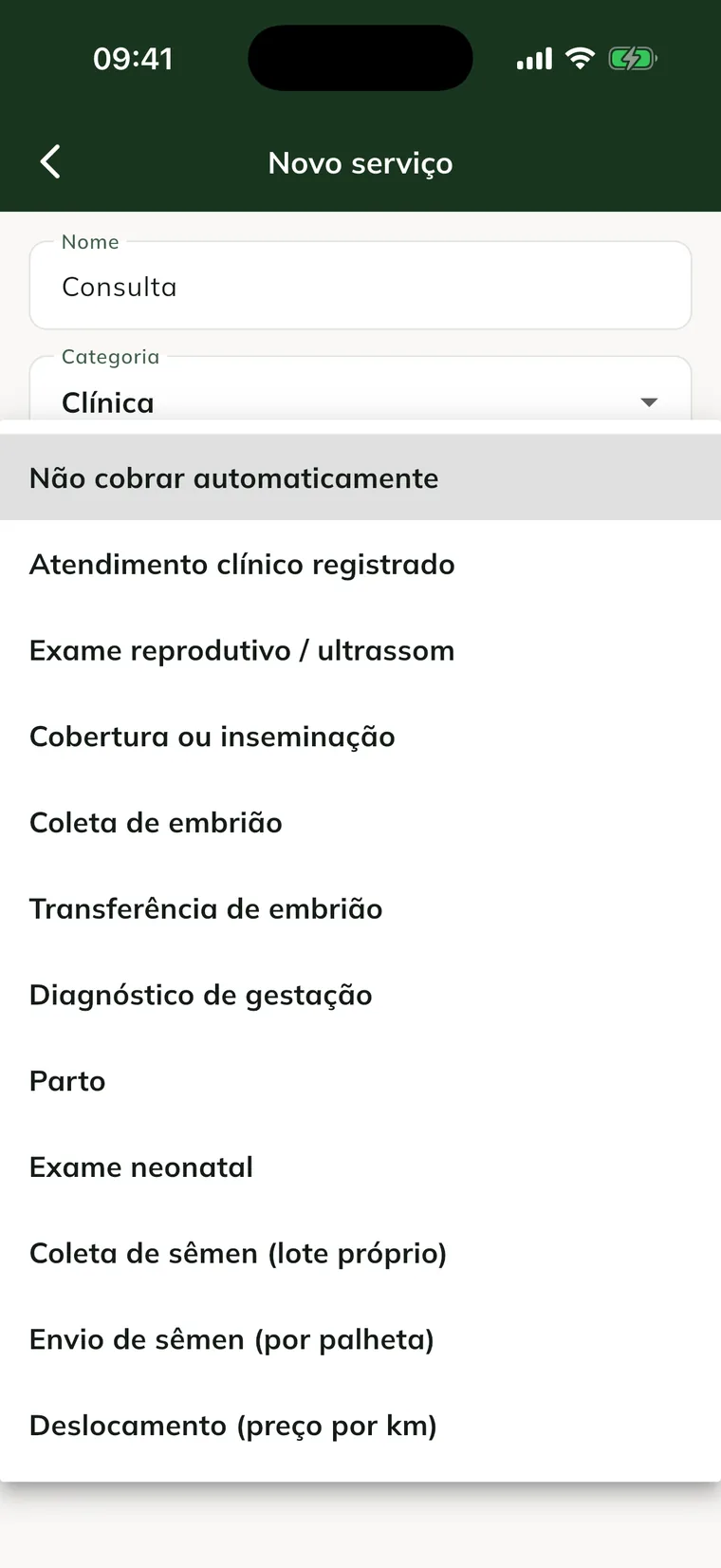
Each event accepts only one active service. If you don't choose an event, the service remains available to add by hand.
2. Give the dose in the field
Works offline.
- In the app, tap More > Pending doses.
- Tap the dose you are going to give.
- In Lot (optional), leave Automatic (expires first) or choose the lot.
- Tap Give dose. The message Dose given. appears.
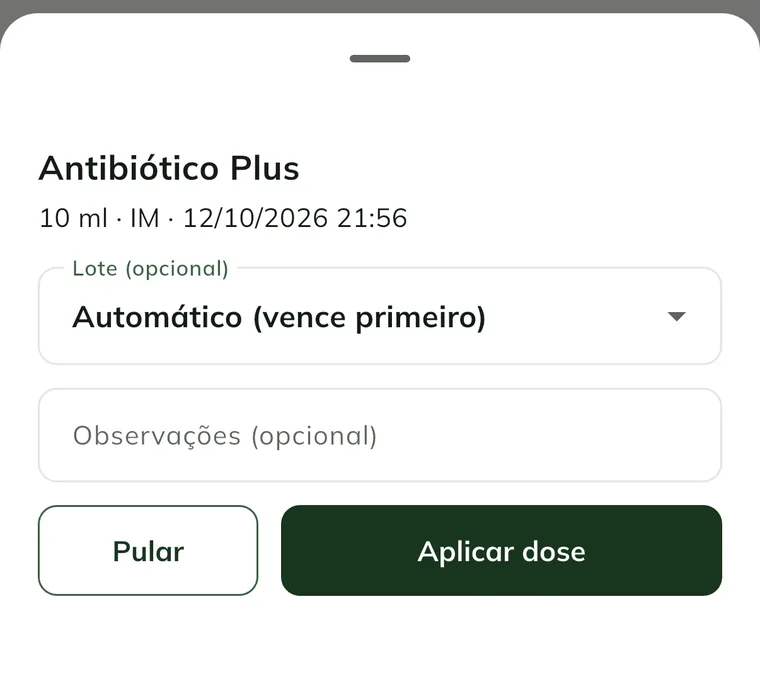
Right away, inventory is deducted and the cost of the dose is recorded. On the web, the same is done in Prescriptions > Apply / skip.
When you get back to the farm office, connect to Wi-Fi and open GENNO. What you recorded in the field uploads to the server, and the services appear in To invoice.
3. Check what is to invoice
- In the app, tap More > Finance > To invoice. On the web, open Finance > To invoice tab.
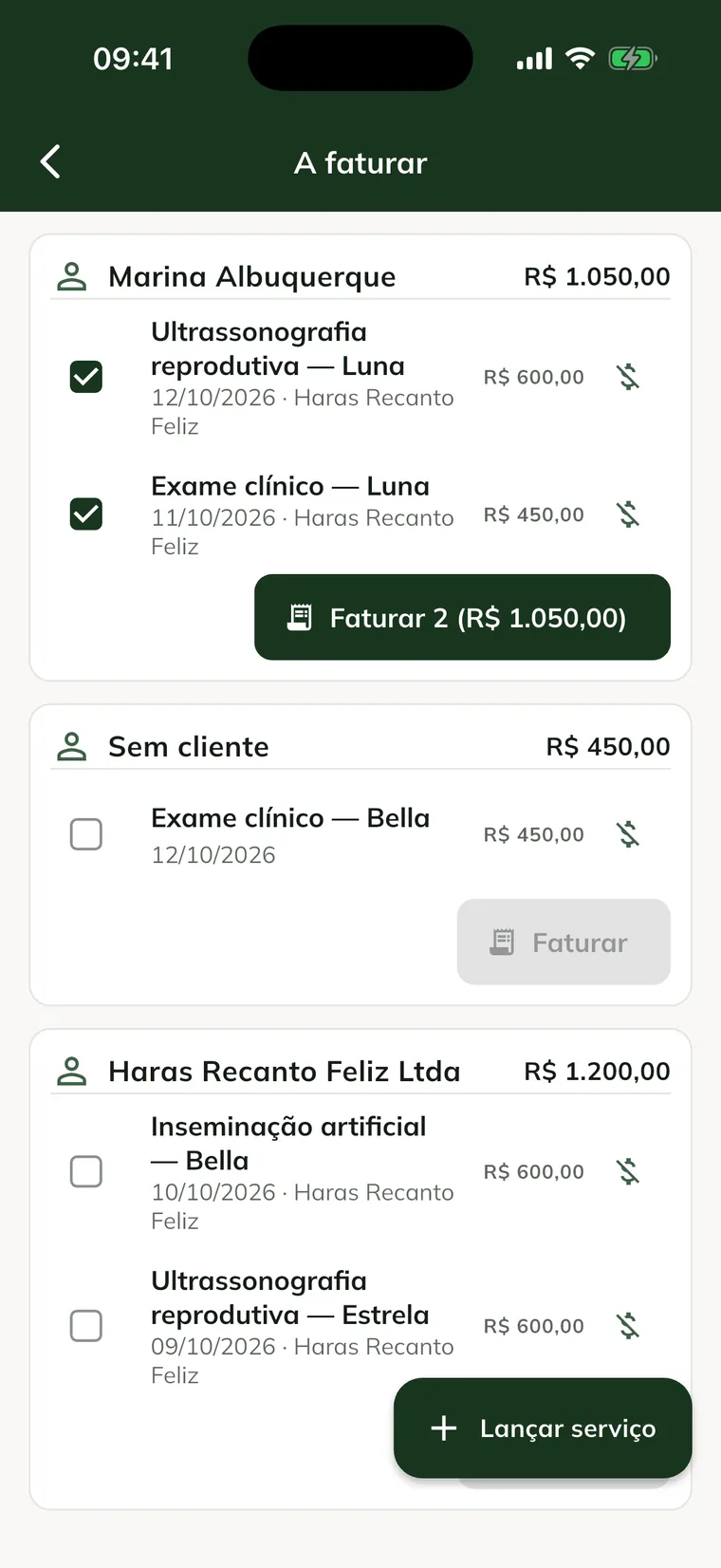
- See the services grouped by client, with date, property and amount.
- If a service shouldn't be charged, tap Do not charge and enter the Reason.
- To charge something that didn't create a charge on its own, tap Add service, fill it in and tap Add.
4. Issue the client's invoice
- In the client's group, select the services that go on the invoice.
- If the group appears as No client, choose the client. In the app, it asks in Invoice which client?. On the web, use the Invoice client... list.
- Tap Invoice. The button shows how many services and the total.
- The message Invoice issued. appears. In the app, the invoice opens right after.
In the app, you can invoice offline. The invoice shows the notice Waiting to be sent to the server. The total is provisional. until the sync.
5. Generate the PDF and send it to the client
The invoice PDF requires internet.
- Open the invoice. In the app: More > Invoices. On the web: Finance > Invoices.
- Tap Invoice PDF. In the app, it is the PDF icon at the top of the screen.
- On the web, the invoice report page opens: click Download PDF (or PDF preview and Print). In the app, tap Generate PDF and share it via WhatsApp or email.
If the owner has portal access, they also see the invoice in Invoices and download the PDF there.
The portal shows the invoice, its status and due date, but doesn't accept online payment yet. The client pays as you agreed (PIX, bank transfer, boleto) and you record the payment in GENNO.
6. Record the payment
- Open the invoice.
- Tap Record payment.
- Choose the Payment method.
- Tap Confirm payment. The status changes to Paid.
To undo an invoice, tap Cancel invoice and enter the Reason. Its services go back to To invoice.
Common problems
"Not enough stock" appeared when giving the dose. GENNO blocks the dose without balance. Record the product's stock-in and give it again.
"Cannot convert the dose... to the stock unit" appeared. Open the product's registration and enter the content per unit. Example: 50 mL per vial.
I gave the dose, but the medication didn't go into the invoice. The product has no sale price, or the dose isn't linked to a visit. The cost remains recorded in inventory and in the animal's cost.
The service I recorded doesn't appear in To invoice. Check that the service has an event in Charge automatically when…. If you recorded it offline, sync: the charge only appears after that.
"The entries belong to different clients: invoice one client at a time." appeared. Select only services from the same client group. The same applies to different currencies.
"Register the client before invoicing." appeared. Register the client in Clients and try again.
"Select a property to see the invoices." appeared. App invoices are per property. Choose the property in Switch Property, in the side menu, and open Invoices again. See how to switch property.
I don't see the Record payment button. Recording payments is only for the farm administrator. Ask them.
Next steps

Didn’t this article solve it?
Talk to the GENNO team. Tell us what you were doing and, if you can, send a screenshot.