How to export the farm data
The data belongs to the farm. At any time, the administrator can download a full copy, to keep or to take to another system.
Before you start
- Exporting is only for the Administrator.
- The export is done on the web, with internet.
Generate the export
- At web.genno.app, click Settings in the menu.
- Scroll to the Export my data card.
- Click Generate export. The button shows Building… while the file is being prepared.
- When the status changes to Ready, click Download.
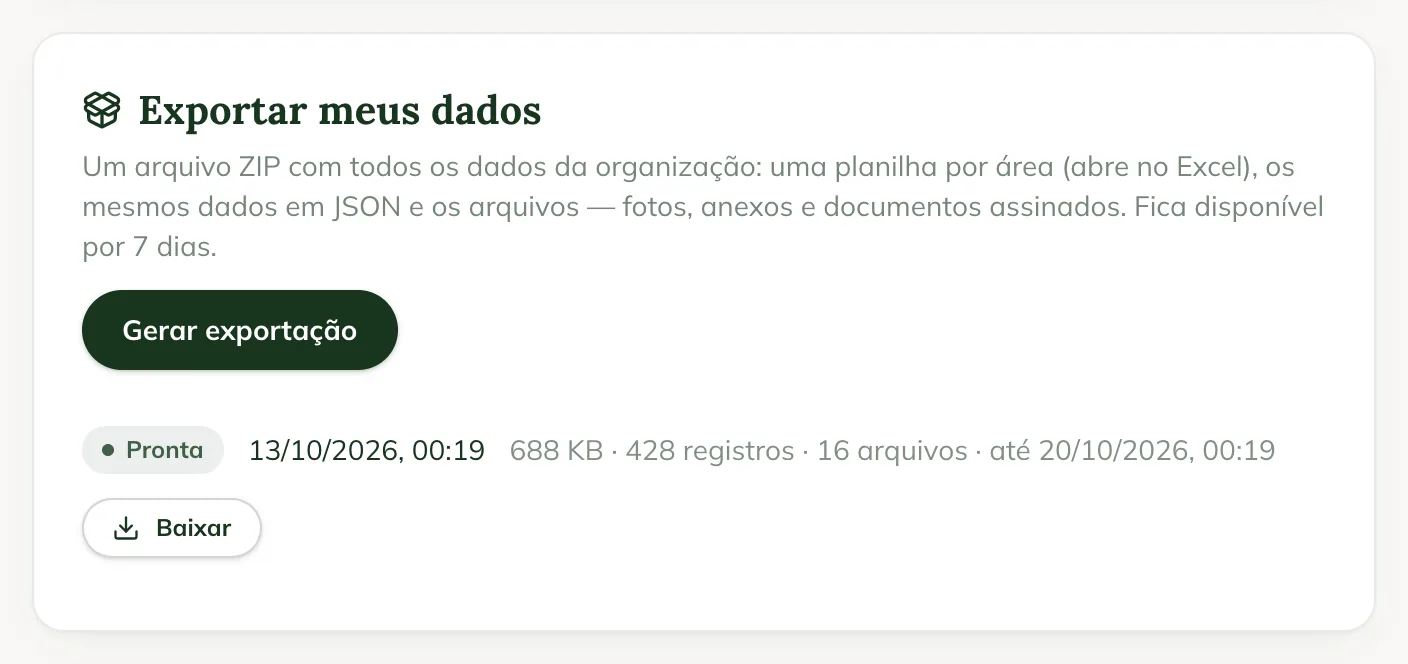
The export's row shows its size, how many records and how many files it has, and until when it is available.
What comes in the file
A ZIP file with all of the organization's data:
- One spreadsheet per area, which opens in Excel.
- The same data in JSON, to take to another system.
- The files: photos, attachments and signed documents.
The file is available for 7 days. After that, the export appears as Expired: generate another one.
After a cancellation
If the subscription was cancelled, the reactivation screen shows until when the data is kept, and the administrator can still export it. See how to cancel the subscription.
Common problems
I don't see the Export my data card. It only appears for the administrator.
The export appears as Failed. Generate another one. If it fails again, contact support.
The file is large. Photos and PDFs take up most of the space. Download it on a computer, with a good connection.
Next steps

Didn’t this article solve it?
Talk to the GENNO team. Tell us what you were doing and, if you can, send a screenshot.